Just Enough Friction: The Story Behind PennyBird
It started with a scare: a personal health emergency while my account was in the red, and suddenly I was borrowing money just to make it to the end of the month. From that moment on, I vowed to be more intentional about my spending and to make sure this never happened again. At the time, my brother was using GnuCash to manage his finances, and I took inspiration from his system to build my own.
In the years since, I’ve cobbled together a personal budget tracking system built around GnuCash, paper receipts, Google Keep, Tricount, and monthly bank statements. The goal was simple: increase awareness of my finances, make better-informed spending decisions, and build reserves over time. The approach was deliberately manual: track every expense, reconcile against my bank statements monthly, and avoid being caught off guard by the numbers. GnuCash provided me with a double-entry accounting system where every transaction is a movement of money between accounts, whether that’s my bank account, my wallet, or a specific category like groceries, travel, or hobbies.
Because GnuCash was only available on my computer, I needed a way to capture information on the go. Every time I spent money, I’d either keep the receipt in my wallet or jot down a description and amount in a pinned note on Google Keep. Every week or so, I’d sit down at my computer, sort those receipts into piles, and manually enter them into GnuCash. Then I’d do the same for the transactions I had logged in Google Keep before deleting them. Every month or so, I’d download my bank statement as a PDF on my iPad, open the GnuCash asset account for my bank account, and reconcile each transaction, marking it as checked in both GnuCash and on the bank statement. When I was done, I’d count the cash in my wallet and reconcile it against its dedicated asset account. For shared expenses with friends and family, I’d also log transactions in Tricount so everyone stayed in sync.
flowchart LR
    SharedExpense["Shared expense"]
    PersonalExpense["Personal expense"]
    Tricount["Tricount<br/>split with others"]
    Keep["Google Keep or receipt<br/>capture on the go"]
    GnuCash["GnuCash<br/>personal accounting"]

    SharedExpense --> Tricount
    SharedExpense --> Keep
    PersonalExpense --> Keep
    Keep --> GnuCash
This might seem like a tedious process, but the friction is what created the awareness I was after. Using this approach, I was able to slowly build a buffer and increase my saving rate over time without feeling frustrated. The visibility helped me align my budget with my wants and priorities. And the awareness gave me a reasonable voice to push against impulse purchases with real data.
This system worked great for me for about a decade, until four years ago when I started living with my wife. We used Tricount to track our shared expenses, and what used to be occasional duplication became constant friction. Every shared transaction I paid for had to be logged three separate times: Tricount, Google Keep, and GnuCash. I started dreading the weekly ritual I’d once found meditative. I still wanted the awareness, but I needed less friction.
Being a software engineer who had been dabbling in SwiftUI, I decided to build my way out of it. The goal: keep GnuCash’s model, make it mobile-first, and make it effortless to record both personal and shared transactions once, at the moment they happen. I’d use it as an opportunity to learn CloudKit—which, it turns out, has a lot of rough edges.
It took me two years, over nights and weekends, to build the personal database model and a version of the app that I could trust with my own data, and in December 2024, I migrated my multi-year GnuCash database into the app and started using it as my main budget tracking system. This instantly felt better: no more paper receipts and no more Google Keep. Now each transaction is entered either once or twice when Tricount is being used.
That’s when I purchased a couple of used test devices and started working on shared accounts.
After multiple rounds of trial and error, the app was stable enough for my wife to start using it as well. She doesn’t track her spending the way I do—and that’s fine. She agreed to log our shared expenses, and that half-step was enough. The app doesn’t ask for more than you’re willing to give. After a successful test during our end-of-year trip to Sevilla in December 2025, I finally released it to the App Store.
PennyBird is built around three things I couldn’t compromise on: privacy, local-first design, and multi-currency support. Your data lives on your device or in your iCloud, never on my servers. The app works perfectly offline and syncs when a connection is available. Being Franco-Tunisian and married to an American made multi-currency support a necessity, not a nice-to-have. And because I actually use it at my Sunday market in the middle of winter, it’s also glove-friendly.
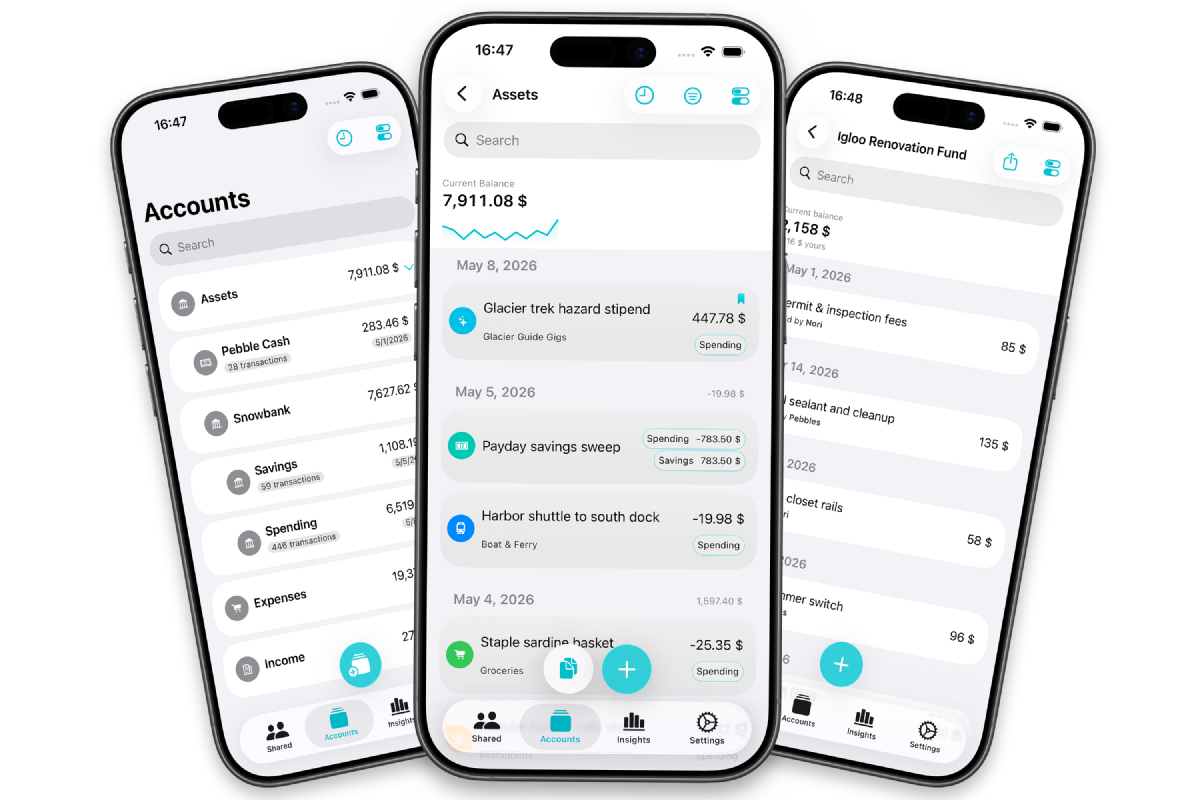
Since December 2025, we’ve been using the app to track our expenses, and it has been a game changer for me. The manual tracking provides just enough friction to create the awareness I needed while allowing me to only log an entry once. And a simple flagging system enables me to mark transactions during the monthly reconciliation. My personal expenses database is now in my pocket.
If you want that kind of financial awareness, manual enough to keep you honest and simple enough to use every day, you can try PennyBird on the App Store.